

Reaktion Academy
Reaktion’s Conversion Events explained
When you install Reaktion and connect a marketing channel like Google Ads and Meta Ads, we automatically create several custom conversion events as “secondary” events. These secondary events do not not influence your existing tracking and marketing setup. Our custom conversion events are based on our own combined browser and server-side tracking.
The various custom conversion events in Reaktion can be found under My Tracking Page > Conversion Events. Click on Manage and here are the various events –
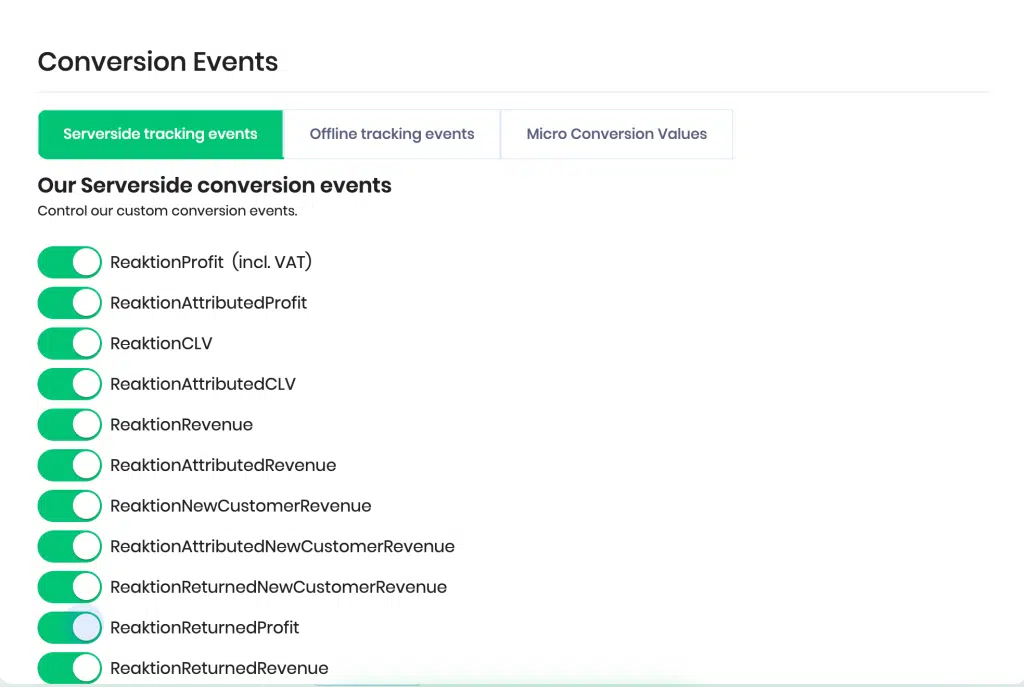
Serverside tracking events
Server-side tracking is our standard server and browser-side tracking. The main advantage of server-side tracking is that we are able to track more revenue and orders when compared to a traditional pixel setup. This is due to the fact that we are able to send order data directly serverside. Generally, ad blockers, ITP, iOS updates, etc are all preventing tracking and tracking scripts from loading on a website. We compensate that loss of tracking by sending all orders server-side. This enables customers to track on average 37% more orders, which in turn helps optimise their marketing campaigns.
There are three standard conversion events that are enabled by default for all users. All of these three events are tailored to optimise your marketing. Each event serves a different purpose as optimisation events:
“ReaktionRevenue” conversion event – this event tracks the Revenue generated.
For Google Ads, ReaktionRevenue event can be supplemented by our ReaktionRevenue “Conversion Booster” event. You can choose to set both events as ‘Primary’.
“ReaktionProfit” conversion event – this event tracks the Profit generated.
For Google Ads, ReaktionProfit event can be supplemented by our ReaktionProfit “Conversion Booster” event. You can choose to set both events as ‘Primary’.
“ReaktionNewCustomerRevenue” conversion event – Revenue generated only from new customers (customers that have never purchased from the web shop before)
Let’s take a look at all the other server-side tracking events below –
ReaktionProfit incl. VAT – this event tracks the Profit generated including VAT values.
ReaktionAttributedProfit – This is the Profit tracked by our Reaktion server-side tracking solution. The Gross Profit is attributed based on your attribution settings (if more than one marketing channel has played a part in the purchase within the conversion window)
ReaktionCLV – this event tracks the customer lifetime value.
ReaktionAttributedCLV – This is the customer lifetime value tracked by our Reaktion server-side tracking solution based on your attribution settings (if more than one marketing channel has played a part in the purchase within the conversion window)
ReaktionAttributedRevenue – This is Revenue tracked by Reaktion by sending data to Google Ads Offline engine or Meta’s offline solution. The Revenue is attributed based on your attribution settings (if more than one marketing channel has played a part in the purchase within the conversion window)
ReaktionAttributedNewCustomerRevenue – This is the defined value of revenue by new customers within a time period based on your attribution settings (if more than one marketing channel has played a part in the purchase within the conversion window)
ReaktionReturnedNewCustomerRevenue – This event tracks refunds made only by new customers.
ReaktionReturnedProfit – this event tracks the lost gross profit generated from sales of products that were previously returned by customers and refunds.
ReaktionReturnedRevenue – this event tracks the revenue generated from sales of products that were previously returned by customers on paid marketing.
ReaktionAttributedExTaxCLV – This is the customer lifetime value excluding VAT, tracked by our Reaktion server-side tracking solution based on your attribution settings (if more than one marketing channel has played a part in the purchase within the conversion window)
ReaktionAttributedNewCustomerProfit – This is the gross profit only from new customers tracked by our Reaktion server-side tracking solution based on your attribution settings (if more than one marketing channel has played a part in the purchase within the conversion window)
ReaktionAttributedNewCustomerExTaxProfit – This is the gross profit excluding VAT only from new customers tracked by our Reaktion server-side tracking solution based on your attribution settings (if more than one marketing channel has played a part in the purchase within the conversion window)
ReaktionAttributedNewCustomerExTaxRevenue – This is the revenue excluding VAT only from new customers tracked by our Reaktion server-side tracking solution based on your attribution settings (if more than one marketing channel has played a part in the purchase within the conversion window)
ReaktionAttributedExTaxProfit – This is the overall gross profit excluding VAT tracked by our Reaktion server-side tracking solution based on your attribution settings (if more than one marketing channel has played a part in the purchase within the conversion window)
ReaktionAttributedExTaxRevenue – This is the Revenue excluding VAT tracked by our Reaktion server-side tracking solution based on your attribution settings (if more than one marketing channel has played a part in the purchase within the conversion window)
ReaktionExTaxCLV – this event tracks the customer lifetime value excluding VAT.
ReaktionNewCustomerProfit – this event tracks the Gross Profit from new customers only.
ReaktionNewCustomerExTaxProfit – this event tracks the Gross Profit excluding VAT from new customers only.
ReaktionNewCustomerExTaxRevenue – this event tracks the Revenue excluding VAT from new customers only.
ReaktionExTaxProfit – this event tracks the Gross Profit excluding VAT.
ReaktionReturnedNewCustomerProfit – this event tracks the lost gross profit due to refunds by new customers only.
ReaktionReturnedNewCustomerExTaxProfit – this event tracks the lost gross profit excluding VAT due to refunds by new customers only.
ReaktionReturnedNewCustomerExTaxRevenue – this event tracks the revenue excluding VAT from returned orders by new customers only.
ReaktionReturnedExTaxProfit – this event tracks the lost gross profit excluding VAT due to refunds.
ReaktionReturnedExTaxRevenue – this event tracks the revenue excluding VAT from returned orders.
ReaktionExTaxRevenue – this event tracks the Revenue generated excluding VAT.
Offline Tracking Events
Besides our Serverside tracking method, Reaktion also supports Google Offline tracking. We send more or less the same data into both web/serverside and their offline method. How Google Ads and Meta Ads then process this data is a black box. We just ensure the best data quality to support the best tracking on both web/serverside tracking and the offline tracking method. The manner in which tracking works for offline conversions is the same as server-side tracking, except that same data is being sent to a different conversion API that’s designed for offline conversions.
Click “Enable” and we will start to track and send data into Google Ads Offline engine too. This will NOT impact your existing tracking or marketing.
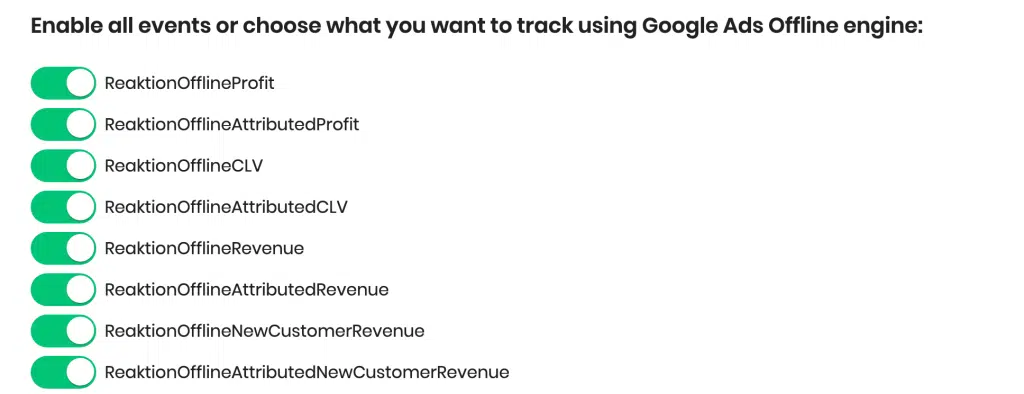
ReaktionOfflineProfit – this event tracks the Profit generated by Google or Meta’s offline tracking solution.
ReaktionOfflineAttributedProfit – this is the Profit tracked by Google or Meta’s offline tracking solution. The Gross Profit is attributed based on your attribution settings (if more than one marketing channel has played a part in the purchase within the conversion window)
ReaktionOfflineCLV – this event tracks the customer lifetime value tracked by offline tracking.
ReaktionOfflineAttributedCLV – this is the customer lifetime value tracked by Google or Meta’s offline tracking solution based on your attribution settings (if more than one marketing channel has played a part in the purchase within the conversion window)
ReaktionOfflineRevenue – this event tracks the revenue tracked by Google or Meta’s offline tracking solution.
ReaktionOfflineAttributedRevenue – this is the offline Revenue tracked by Reaktion by sending data to Google Ads Offline engine or Meta. The Revenue is attributed based on your attribution settings (if more than one marketing channel has played a part in the purchase within the conversion window)
ReaktionOfflineNewCustomerRevenue – Revenue generated only from new customers tracked by Google or Meta’s offline tracking solutions (customers that have never purchased from the web shop before)
ReaktionOfflineAttributedNewCustomerRevenue – this is the defined value of revenue by new customers tracked by Google or Meta’s offline tracking solutions within a time period based on your attribution settings (if more than one marketing channel has played a part in the purchase within the conversion window)
ReaktionOfflineReturnedNewCustomerRevenue – This event tracks refunds made only by new customers tracked by Google or Meta’s offline tracking solutions.
ReaktionOfflineReturnedProfit – this event tracks the lost gross profit tracked by Google or Meta’s offline tracking solutions, generated from sales of products that were previously returned by customers and refunds.
ReaktionOfflineReturnedRevenue – this event tracks the revenue generated from sales of products that were previously returned by customers on paid marketing.
ReaktionOfflineAttributedExTaxCLV – this is the customer lifetime value excluding VAT, tracked by Google or Meta’s offline tracking solutions based on your attribution settings (if more than one marketing channel has played a part in the purchase within the conversion window)
ReaktionOfflineAttributedNewCustomerProfit – this is the gross profit only from new customers tracked by Google or Meta’s offline tracking solutions based on your attribution settings (if more than one marketing channel has played a part in the purchase within the conversion window)
ReaktionOfflineAttributedNewCustomerExTaxProfit – This is the gross profit excluding VAT only from new customers tracked by Google or Meta’s offline tracking solutions based on your attribution settings (if more than one marketing channel has played a part in the purchase within the conversion window)
ReaktionOfflineAttributedNewCustomerExTaxRevenue – This is the Revenue excluding VAT only from new customers tracked by Google or Meta’s offline tracking solutions based on your attribution settings (if more than one marketing channel has played a part in the purchase within the conversion window)
ReaktionOfflineAttributedExTaxProfit – This is the overall gross profit excluding VAT tracked by Google or Meta’s offline tracking solutions based on your attribution settings (if more than one marketing channel has played a part in the purchase within the conversion window)
ReaktionOfflineAttributedExTaxRevenue – This is the Revenue excluding VAT tracked by Google or Meta’s offline tracking solutions based on your attribution settings (if more than one marketing channel has played a part in the purchase within the conversion window)
ReaktionOfflineExTaxCLV – this event tracks the customer lifetime value excluding VAT, tracked by Google or Meta’s offline tracking solutions.
ReaktionOfflineNewCustomerProfit – this event tracks the Gross Profit from new customers only, tracked by Google or Meta’s offline tracking solutions.
ReaktionOfflineNewCustomerExTaxProfit – this event tracks the Gross Profit excluding VAT from new customers only, tracked by Google or Meta’s offline tracking solutions.
ReaktionOfflineNewCustomerExTaxRevenue – this event tracks the Revenue excluding VAT from new customers only, tracked by Google or Meta’s offline tracking solutions.
ReaktionOfflineExTaxProfit – this event tracks the Gross Profit excluding VAT, tracked by Google or Meta’s offline tracking solutions.
ReaktionOfflineReturnedNewCustomerProfit – this event tracks the lost gross profit due to refunds by new customers only, tracked by Google or Meta’s offline tracking solutions.
ReaktionOfflineReturnedNewCustomerExTaxProfit – this event tracks the lost gross profit excluding VAT due to refunds by new customers only, tracked by Google or Meta’s offline tracking solutions.
ReaktionOfflineReturnedNewCustomerExTaxRevenue – this event tracks the revenue excluding VAT from returned orders by new customers only, tracked by Google or Meta’s offline tracking solutions.
ReaktionOfflineReturnedExTaxProfit – this event tracks the lost gross profit excluding VAT due to refunds, tracked by Google or Meta’s offline tracking solutions.
ReaktionOfflineReturnedExTaxRevenue – this event tracks the revenue excluding VAT from returned orders, tracked by Google or Meta’s offline tracking solutions.
ReaktionOfflineExTaxRevenue – this event tracks the Revenue generated excluding VAT, tracked by Google or Meta’s offline tracking solutions.
Micro Conversion Values
To use micro conversions in your marketing optimisation you need to assign an avg. value per micro conversion event. You can choose a timeframe and desired webshop(s) to set the micro conversion values. Reaktion supports two kinds of micro conversions –
Transactional micro conversion indicators:
Add to Cart event – refers to the action taken by a user when they add a product to their shopping cart on a website or mobile app. This event is strongly correlated to transactions, so this is a highly recommended event.
Initiate checkout event – occurs when a user starts the process of proceeding to checkout after adding one or more items to their shopping cart. This event signals a higher level of commitment from the user towards completing a purchase.
Added payment info event – occurs when a user enters or updates their payment information during the checkout process.
Browsing behaviour micro-conversions:
Page View event – it is a fundamental metric that tracks the number of times a specific web page is viewed by users.
Product view event – it is a fundamental metric that tracks the number of times a specific product is viewed by users.
Search event – refers to a user conducting a search query within a website or app’s search functionality.